
A tailored resume connects the job’s requirements to evidence from your experience. To tailor your resume to a job description, identify its priority skills, match them to relevant examples, then refine your summary and bullet points without overstating your qualifications. Keep a master resume as your source document, and adjust the most relevant details for each application.
Sending the same resume everywhere may feel faster, but tailoring your resume to a job description helps employers see how your experience fits the role. Start by identifying the key requirements, matching them to your skills and achievements, and rewriting bullets with specific evidence. Then create and review a focused version for each application that reflects the position while still sounding like you.
Key Takeaways
- Scan the job description for repeated phrases and priority qualifications, then reflect relevant language where it accurately describes your experience.
- Use simple, readable formatting so applicant tracking systems can parse your resume’s sections and content.
- Match each key requirement with a specific example from your work, education, or projects.
- Reorder skills and refine resume bullets to bring the most relevant evidence forward without overstating your role.
- Build from a master resume, then edit each version to fit the position while keeping your voice natural and consistent.
How to tailor your resume for a specific job?
Start with the job posting: identify repeated terms and connect them to evidence in your resume. Use those terms accurately, never as a substitute for relevant experience.
-
Extract Repeated Job-Description Keywords
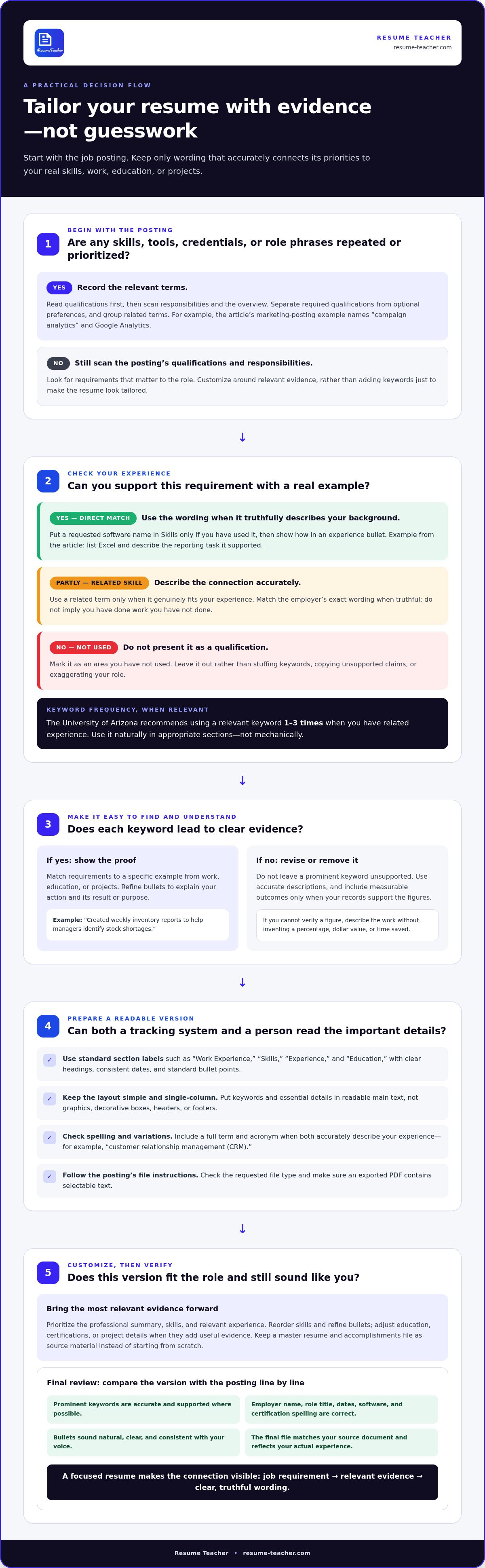
Read the qualifications first, then scan the responsibilities and overview. Note repeated skills, tools, credentials, and phrases that describe the role. If a marketing posting mentions “campaign analytics” several times and names Google Analytics, record both the skill and the software. Group related terms, such as “project coordination” and “project management,” but use the employer’s exact wording when it truthfully describes your background.
Separate required qualifications from optional preferences. Mark each keyword as a direct match, a related skill, or an area you haven’t used. This prevents a rewrite from implying experience you don’t have. The University of Arizona recommends using a relevant keyword 1-3 times when you have the related experience. Use it naturally in appropriate sections, rather than repeating it mechanically.
-
Match Keywords for Applicant Tracking Systems
Use accurate job-description keywords in context to help applicant tracking systems identify how your qualifications relate to the posting. Add a requested software name to your skills section only if you’ve used it, then show how in an experience bullet. For example, list Excel under skills and describe the reporting task it supported.
Check spelling, acronyms, and common variations. If a posting uses “customer relationship management (CRM),” include the full term and acronym if both accurately describe your experience. Avoid keyword stuffing, hidden text, or a long skills list that isn’t supported by your work history. An applicant tracking system may scan for terms, but hiring managers still need clear evidence. Every keyword should point to a real skill, project, or responsibility.
Make your resume easy to parse. Use standard section labels such as “Work Experience” and “Skills,” and put keywords in readable text. Keep important qualifications out of graphics and decorative boxes. Match the posting’s wording when truthful, while keeping your resume concise and clear to human readers.
-
Customize Relevant Resume Sections
Customize your professional summary, skills, and experience bullets for each application. Put your strongest matching qualifications near the top, and adjust education, certifications, or project details when they support the role. Which resume sections should I customize for each job application? Prioritize the summary, skills, and relevant experience. Revise other sections only when they add useful evidence for the role.
How long should it take to tailor a resume for one job? It depends on how closely your experience matches the posting and how much revision your examples need. A focused application may require only targeted changes, while a role with different priorities may call for reviewing more accomplishments. Keep a master resume and an accomplishments file so you can select and refine strong examples instead of starting from scratch.
Before submitting, compare your revised resume with the posting line by line. Confirm that each prominent keyword is accurate, requirements are supported with relevant evidence where possible, and the final document reflects your actual experience.
Will my resume sound robotic?
No, as long as each tailored phrase reflects your actual work and sounds natural in context. Use the posting to guide your edits, then review the full resume for clarity, accuracy, and a consistent voice.
- Keep the layout simple for tracking systems and human readers. Use clear headings such as “Experience” and “Education,” consistent dates, and standard bullet points. The University of Arizona notes that applicant tracking systems may not read special characters or content in boxes, shading, lines, or borders. It also says these systems ignore headers, footers, and page numbers, so keep essential details in the main text.
Choose a straightforward, single-column layout. Keep contact details and key skills out of decorative elements. The University of Arizona advises against resume templates and distracting formatting for online submissions. Before applying, check the job posting for its requested file type and ensure your exported PDF contains selectable text.
- Quantify achievements when you can support the figures. Replace “improved customer service” with a specific description, such as “resolved customer requests and reduced repeat follow-ups.” Include a measurable outcome only when your records support it. If you can’t verify a figure, describe the work accurately without inventing a percentage, dollar value, or time saved.
Keep each bullet focused on your action and its result. For example, “Created weekly inventory reports to help managers identify stock shortages” explains both the task and its purpose. This kind of evidence makes tailored wording sound like your experience, not copied text. Use the posting’s terminology selectively, then read each bullet aloud to catch awkward phrasing.
- Proofread each version against the specific job posting before submitting. Check the employer’s name, role title, dates, software names, and certification spelling. A resume addressed to the wrong company or showing an outdated title can weaken an otherwise relevant application. Compare the final file with your source document to catch accidental deletions.
What resume tailoring mistakes can hurt an application? Keyword stuffing, copying job-posting sentences without evidence, and exaggerating qualifications can undermine your credibility. Sending the wrong version or misspelling an employer’s name can also make your editing seem careless.
- Review the PDF both as a reader and as searchable text. Open it on screen, inspect the page breaks, and copy a sentence into a plain-text document. If the text appears scrambled, simplify the layout and export the file again. Name each version clearly, such as “Jordan-Lee-Operations-Analyst,” to avoid attaching the wrong application file.
For a repeatable final review, use a resume formatting workflow to check layout consistency alongside your own proofreading. Confirm that the document reads naturally from summary to experience, and that every emphasized skill has a concrete example behind it.
Matching resume skills and experience to job requirements
Map each priority requirement to evidence from your work, education, or projects. Then arrange your resume so the strongest proof appears first.
-
Identify the Role Requirements
Start with the qualifications section of the job ad. Separate required skills from preferred ones, then note the experience each calls for. A project manager posting might ask for budgeting, stakeholder communication, and scheduling. Make a short list of these requirements before editing your resume.
Prioritize qualifications over the overview and general responsibilities. For each requirement, write down an example that demonstrates your fit, and note any without direct evidence. This helps prevent you from presenting a related skill as an exact match. A focused list keeps your edits centered on the employer’s core needs instead of every phrase in the ad.
-
Prioritize Relevant Experience and Accomplishments
Move your strongest matching evidence toward the top of each relevant section. Recruiters favor resumes that match the role, and a focused structure helps a candidate stand out during an initial scan. If a posting emphasizes reporting, lead with a reporting achievement rather than an unrelated responsibility. You can label a section “Relevant Experience” when that better signals fit.
Choose accomplishments from your work history that demonstrate the required skills. An accomplishments file makes it easier to compare examples from different roles. For a team-lead position, prioritize mentoring or workflow improvements over routine tasks. Keep other experience, but give it less space when it doesn’t support the role’s central requirements.
-
Align Work Experience With the Job Ad
Match each requirement to a specific task, project, or result from your experience. If the ad seeks customer issue resolution, describe the cases you handled and how you resolved them. Use the employer’s terminology when it accurately describes your work. Don’t paste a responsibility from the job ad into your resume.
Rewrite bullets to make the connection clear. For example, replace “handled customer requests” with “resolved billing questions and documented recurring issues for the support team.” Include measurable outcomes only when you can substantiate them. The reader should see how your evidence relates to the requirement without having to guess.
-
Tailor a Resume With Limited Experience
Use coursework, projects, internships, volunteer work, or contract assignments to demonstrate relevant skills. For an entry-level data role, a class project using spreadsheets can show analytical experience. Describe the project’s goal, your contribution, and the tools involved. Put the most relevant project above less related work when it provides stronger evidence for the role.
Address gaps honestly. If a posting requests a tool you haven’t used, don’t imply that you’re proficient in it. Highlight a related tool or transferable skill only when you can show how you applied it. If a role requires a skill you lack, contract work or education may help you develop it before applying. Focus on demonstrated abilities, not unsupported claims.
Reordering skills and rewriting resume bullets
Use your skills section and experience bullets to highlight relevant strengths. Compare each edit with the job description, and make sure every claim is accurate.
-
Analyze the Resume for Missing Skills
Place your resume beside the job description and mark each requested skill as demonstrated, transferable, or missing. For example, a posting may ask for scheduling software, while your resume mentions only coordinating appointments. Note the gap without claiming you’ve used the software.
Look across your roles, projects, and education before deciding a skill is missing. A budget-planning task, for instance, might demonstrate analytical ability, even if your title never included “analyst.” O*NET’s occupation task descriptions can also help you identify duties to describe more clearly. Don’t add an endless list of skills to cover every phrase in the posting.
-
Reorder the Skills Section
Move the strongest role-specific skills to the top of your skills section. If a job emphasizes data visualization, list relevant tools and methods before general strengths such as communication. This order makes the closest match easier to spot. Use categories such as “Technical Skills” and “Operations” when they improve readability.
Remove or move skills that distract from the target role. A broad list can dilute your strongest qualifications by mixing unrelated abilities with core requirements. Check that every item has a real example in your experience, education, or projects. Don’t let a generic template determine the order when the job description points to different priorities.
-
Rewrite Bullets to Highlight Transferable Skills
Revise each relevant bullet to show an action, a skill, and its context. For example, change “organized weekly volunteer shifts” to “coordinated volunteer schedules and resolved last-minute coverage gaps.” This wording highlights planning and problem-solving without changing the work you did. Choose verbs that accurately describe your contribution.
Transferable skills matter when your career path differs from the role. A retail worker applying for office coordination could highlight recordkeeping, scheduling, and issue resolution. Add a measurable result only when you can support it. Read each revised bullet aloud and replace stiff wording with language you’d use to explain the work in an interview.
-
Compare the Resume With the Job Description
Yes. Use a spreadsheet or side-by-side document to compare your resume with the job requirements. Create columns for each requirement, matching evidence, and any gap. For example, match “inventory control” to specific stock records or ordering tasks you handled. This review makes missing evidence visible before you submit.
Use the comparison to guide revisions, not to chase a perfect keyword score. Check whether each important requirement appears in a relevant section and whether the supporting example is easy to find. Make sure the final version highlights your actual strengths, not phrases copied from the posting. Keep the skills section consistent with your work history.
Generating and editing tailored resumes
Build a reusable core resume, then tailor it to each position. This approach keeps applications efficient while making every version relevant and credible.
- Create a master resume that records your roles, projects, tools, and achievements. Keep detailed source bullets, including work that won’t fit every application. For example, record separate examples of client communication, data reporting, and process improvement. You’ll have accurate material to draw on without rebuilding your history for every posting.
Compare several job descriptions for the positions you want. Note recurring qualifications and responsibilities, then use those patterns to shape your core resume. If project coordination appears repeatedly, highlight evidence of scheduling, stakeholder updates, or delivery. Don’t make the core document so narrow that it no longer reflects your broader experience.
- Draft a tailored version by selecting evidence that matches the specific posting. Start with required qualifications, then choose relevant responsibilities and achievements. If the role emphasizes customer retention, prioritize examples of resolving customer issues or improving follow-up. Tie every bullet to your actual contribution rather than a phrase copied from the advertisement.
Treat an AI-generated draft as a starting point, not a finished application. Review every suggested phrase for accuracy, tone, and context. Replace generic claims such as “results-driven professional” with a concrete example, such as coordinating a launch across sales and support. Remove any tools, certifications, or outcomes the draft adds without evidence.
- Edit the draft in order: headline, summary, skills, then experience. Use the position’s terminology when it truthfully describes your background. If your past title differs from current industry language, list your actual title followed by an equivalent contemporary title in parentheses. Preserve your original title while making the role easier to understand.
Read the edited resume aloud to check its flow. Strong writing uses varied, direct language instead of repeating the same keyword in every bullet. Confirm that each prominent skill has supporting evidence and that no rewrite exaggerates your responsibility. For example, accurately distinguish “supported a launch” from “led a launch.”
- Compare the final draft with the posting before applying. Check that the main requirements have relevant evidence, your strongest examples appear early, and the document still sounds like you. Save each version with a clear filename identifying the position, then reopen it to make sure it’s the right application document.
For a repeatable drafting workflow, build and refine a tailored resume from your core experience. Use the resulting draft as a starting point, then make the final edits yourself. This approach keeps each application matched to its posting without sacrificing accuracy or a consistent professional voice.
Resume Teacher: Resume Builder
Resume Teacher helps you turn a master resume into focused application versions. Its Resume Builder, AI Resume Writer, and resume templates support drafting and refining content for a specific role. Use them to organize your experience, improve bullet wording, and align relevant details with a posting. Review every suggestion for accuracy and a natural voice.
For keyword-focused edits, use Resume Teacher’s real-time ATS formatting and keyword optimization to refine your resume for a posting. Keep every final decision grounded in your actual skills and achievements. If you also need a role-specific letter, the AI Cover Letter Generator can help you present the same qualifications and examples.
Build and refine your next resume with Resume Teacher.
Make Every Application a Stronger Next Step
To tailor your resume to a job description effectively, treat each application as part of a deliberate process. After submitting, note the role you targeted and the skills or accomplishments you emphasized. When similar requirements appear in later postings, use those notes to refine your core resume with evidence you can support. This creates a useful record and helps keep future edits consistent.
Set a clear standard for each version: it should fit the role, accurately represent your experience, and sound like you. Before sending your next application, make one final pass for clarity and confirm that the document reflects the work you want to do next. Deliberate edits help you present your strengths precisely.
Contact Resume Teacher for resume help as you prepare your next application. Keep moving forward with a resume that reflects your experience and direction.
Frequently Asked Questions
Is it worth the effort, though?
Yes, a focused resume makes your fit easier to recognize. A tailored resume is associated with being 31% more likely to land an interview. Treat that figure as an association, not a promised outcome. The practical benefit is control: you can foreground the experience that matters for a particular role instead of asking employers to interpret a general resume. Prioritize applications where your background matches the core requirements.
What keywords should be included in a resume?
Include terms that accurately describe your relevant skills, credentials, tools, and responsibilities. A logistics coordinator might list “inventory management,” “vendor communication,” and a scheduling platform they’ve used. Include industry terminology only if it reflects your experience. Pair broad capabilities with specific examples, so a keyword such as “analysis” points to work you can explain in an interview.
How do I tailor my resume to a job description step by step?
To tailor your resume to a job description, first identify the role’s core qualifications. Then select evidence from your work, studies, or projects for each one. Adjust your summary, skills, and experience details to emphasize the strongest matches, then check accuracy, spelling, and the employer’s name. For example, a communications role may call for moving a writing sample or campaign result higher on the page.
How do I identify the most important keywords in a job posting?
Start with the qualifications and required-skills sections, then compare their terms with the duties listed elsewhere. Prioritize requirements repeated across sections, named tools, and credentials described as essential. If a posting requests both scheduling and calendar management, for example, those related phrases point to a key capability. Separate required qualifications from preferred ones so optional terms don’t crowd out essential evidence.
How can I match resume skills and experience to job requirements without exaggerating?
Connect each requirement to a real example and describe your contribution precisely. If you assisted with a budget, write “supported budget tracking,” not “managed the budget.” For a skill you’ve used in another setting, explain the task and context rather than claiming direct industry experience. Leave a requirement unmatched if you lack evidence. Accurate distinctions help you discuss your resume confidently and keep every claim consistent.
How do applicant tracking systems (ATS) scan resumes for keywords?
Applicant tracking systems process resume text and can compare its terms with information in a job application. Clear section labels and readable text make details such as skills, job titles, and education easier to organize. How the system uses that information depends on its configuration and the employer’s process. A keyword match alone doesn’t show your level of expertise, so connect relevant terms to concrete examples in your resume.
How do I quantify accomplishments to align with a job description?
Use records to identify measurable scope or outcomes, such as projects completed, accounts supported, or processing time reduced. For a sales-support role, a documented count of proposals prepared could show your workload more clearly than “helped the sales team.” Include a figure only when you can explain its source and meaning. If you have no reliable metric, describe the task, audience, or project outcome without inventing numbers.
Should I use the exact wording from a job posting on my resume?
Use the posting’s wording when it accurately describes your experience, especially for tools, certifications, and established role terminology. If the ad says “client onboarding” and that matches your work, the phrase can make your experience easier to recognize. Don’t copy full sentences or use a title that misrepresents your position. Keep your own voice, and add a concise example showing what the matching term means in practice.

Article by
Dr Mutyaba Ashraf Semakula
Hi, I’m Ashraf, the founder of ResumeTeacher, a platform dedicated to helping people present their skills, experience, and achievements with confidence.
I created ResumeTeacher because I believe everyone deserves the opportunity to pursue their career goals. However, writing a professional resume or cover letter can be challenging, especially when you have valuable experience but struggle to communicate it effectively. My goal is to make that process simpler, more accessible, and less stressful.
I’m passionate about technology, career development, and creating practical solutions to everyday challenges. Through ResumeTeacher, I help job seekers build professional resumes, create compelling cover letters, and organize their job applications more effectively.
I also enjoy sharing practical advice through articles on resume writing, job search strategies, interview preparation, and career growth. I want my content to be useful, easy to understand, and relevant to people at different stages of their careers, from first-time job seekers to experienced professionals looking for new opportunities.
Building ResumeTeacher is my way of combining technology with a purpose that matters to me: helping people communicate their value and approach their careers with greater confidence. I believe that while no tool can guarantee a job, having the right resources and presenting yourself professionally can make the journey easier.
Through my work and writing, I hope to help people recognize their strengths, improve their applications, and take meaningful steps toward their professional goals.


